
340 lines
15 KiB
Markdown
340 lines
15 KiB
Markdown
<div align="center">
|
||
|
||

|
||
|
||
# New API
|
||
|
||
**連接模型、應用程式與 Agent 的 AI 閘道**
|
||
|
||
<p align="center">
|
||
<a href="./README.zh_CN.md">简体中文</a> |
|
||
<strong>繁體中文</strong> |
|
||
<a href="./README.md">English</a> |
|
||
<a href="./README.fr.md">Français</a> |
|
||
<a href="./README.ja.md">日本語</a>
|
||
</p>
|
||
|
||
<p align="center">
|
||
<a href="https://raw.githubusercontent.com/Calcium-Ion/new-api/main/LICENSE">
|
||
<img src="https://img.shields.io/github/license/Calcium-Ion/new-api?color=brightgreen" alt="license">
|
||
</a>
|
||
<a href="https://github.com/Calcium-Ion/new-api/releases/latest">
|
||
<img src="https://img.shields.io/github/v/release/Calcium-Ion/new-api?color=brightgreen&include_prereleases" alt="release">
|
||
</a>
|
||
<a href="https://hub.docker.com/r/CalciumIon/new-api">
|
||
<img src="https://img.shields.io/badge/docker-dockerHub-blue" alt="docker">
|
||
</a>
|
||
<a href="https://atomgit.com/QuantumNous/new-api" target="_blank">
|
||
<img alt="AtomGit G-Star" src="https://atomgit.com/QuantumNous/new-api/star/badge.svg"/>
|
||
</a>
|
||
</p>
|
||
|
||
<p align="center">
|
||
<a href="https://trendshift.io/repositories/20180" target="_blank">
|
||
<img src="https://trendshift.io/api/badge/repositories/20180" alt="QuantumNous%2Fnew-api | Trendshift" style="width: 250px; height: 55px;" width="250" height="55"/>
|
||
</a>
|
||
<br>
|
||
<a href="https://hellogithub.com/repository/QuantumNous/new-api" target="_blank">
|
||
<img src="https://api.hellogithub.com/v1/widgets/recommend.svg?rid=539ac4217e69431684ad4a0bab768811&claim_uid=tbFPfKIDHpc4TzR" alt="Featured|HelloGitHub" style="width: 250px; height: 54px;" width="250" height="54" />
|
||
</a>
|
||
<a href="https://atomgit.com/QuantumNous/new-api" target="_blank">
|
||
<img alt="AtomGit G-Star" src="https://atomgit.com/QuantumNous/new-api/star/new_badge.svg" width="250" height="55" />
|
||
</a>
|
||
</p>
|
||
|
||
<p align="center">
|
||
<a href="#capabilities">核心能力</a> •
|
||
<a href="#quick-start">快速開始</a> •
|
||
<a href="#deployment">部署維運</a> •
|
||
<a href="#development">開發擴充</a> •
|
||
<a href="#documentation">文件社群</a>
|
||
</p>
|
||
|
||
</div>
|
||
|
||
---
|
||
|
||
## 📝 項目說明
|
||
|
||
New API 是面向應用程式、Agent 和團隊的自託管 AI 閘道。將不同供應商的模型服務接入統一入口,在同一套控制台中管理渠道、存取權限、用量與成本。
|
||
|
||
你可以用它為團隊分配已授權的模型資源,在切換上游時減少用戶端改動,或建置自己的多模型服務。支援接入 OpenAI、Anthropic、Google Gemini、Azure OpenAI、AWS Bedrock、Vertex AI、DeepSeek、通義千問及其他相容服務。
|
||
|
||
> [!IMPORTANT]
|
||
> - 本專案僅面向合法授權的 AI API 閘道、組織內部鑑權、多模型管理、用量統計、成本核算和私有化部署場景。
|
||
> - 使用者必須合法取得上游 API Key、帳號、模型服務或介面權限,並遵守上游服務條款及適用法律法規。
|
||
> - 使用者應確保其使用方式符合上游服務條款及適用法律法規。
|
||
> - 面向公眾提供生成式人工智慧服務時,使用者應遵守[《生成式人工智慧服務管理暫行辦法》](http://www.cac.gov.cn/2023-07/13/c_1690898327029107.htm)等監管要求,自行完成所在司法轄區要求的備案、許可、內容安全、實名、日誌留存、稅務和上游授權等合規義務。
|
||
|
||
<!-- -->
|
||
|
||
> [!WARNING]
|
||
> 將本專案作為面向公眾的生成式 AI 服務或 API 轉售服務運營時,使用者應先完成備案、內容安全、實名、日誌留存、稅務、支付和上游授權等合規義務。
|
||
|
||
---
|
||
|
||
## 🤝 我們信任的合作伙伴
|
||
|
||
<p align="center">
|
||
<em>排名不分先後</em>
|
||
</p>
|
||
|
||
<p align="center">
|
||
<a href="https://www.cherry-ai.com/" target="_blank">
|
||
<img src="./docs/images/cherry-studio.png" alt="Cherry Studio" height="80" />
|
||
</a><!--
|
||
--><a href="https://github.com/iOfficeAI/AionUi/" target="_blank">
|
||
<img src="./docs/images/aionui.png" alt="Aion UI" height="80" />
|
||
</a><!--
|
||
--><a href="https://bda.pku.edu.cn/" target="_blank">
|
||
<img src="./docs/images/pku.png" alt="北京大學" height="80" />
|
||
</a><!--
|
||
--><a href="https://www.aliyun.com/" target="_blank">
|
||
<img src="./docs/images/aliyun.png" alt="阿里雲" height="80" />
|
||
</a><!--
|
||
--><a href="https://io.net/" target="_blank">
|
||
<img src="./docs/images/io-net.png" alt="IO.NET" height="80" />
|
||
</a>
|
||
</p>
|
||
|
||
---
|
||
|
||
## 🙏 特別鳴謝
|
||
|
||
<p align="center">
|
||
<a href="https://www.jetbrains.com/?from=new-api" target="_blank">
|
||
<img src="https://resources.jetbrains.com/storage/products/company/brand/logos/jb_beam.png" alt="JetBrains Logo" width="120" />
|
||
</a>
|
||
</p>
|
||
|
||
<p align="center">
|
||
<strong>感謝 <a href="https://www.jetbrains.com/?from=new-api">JetBrains</a> 為本項目提供免費的開源開發許可證</strong>
|
||
</p>
|
||
|
||
---
|
||
|
||
<a id="capabilities"></a>
|
||
|
||
## 核心能力
|
||
|
||
| 方向 | 可以做什麼 |
|
||
| --- | --- |
|
||
| 模型接入 | 支援 OpenAI Chat Completions、Responses、Anthropic Messages 和 Gemini 協定,以及上游支援的串流輸出、工具呼叫、推理與多模態輸入 |
|
||
| 渠道調度 | 設定模型映射、渠道優先順序與權重、失敗重試、渠道親和性和多金鑰管理 |
|
||
| 用量與成本 | 管理額度、訂閱方案、用量日誌、快取計費,以及基於運算式的階梯定價 |
|
||
| 存取控制 | 管理使用者、群組、細粒度權限和 API Key 限制;支援 OAuth/OIDC、通行密鑰、兩步驟驗證與登入工作階段管理 |
|
||
| 非同步任務 | 透過 JavaScript 外掛擴充圖片、影片等任務 API,統一查詢任務狀態和取得產物 |
|
||
| Web 控制台 | 設定渠道與模型、查看用量和稽核日誌、在 Playground 中測試模型;支援簡體中文、繁體中文、英語、法語、日語、俄語和越南語 |
|
||
|
||
### 協定與介面
|
||
|
||
| 介面類型 | 常用入口 |
|
||
| --- | --- |
|
||
| OpenAI Chat / Responses | `POST /v1/chat/completions`、`POST /v1/responses` |
|
||
| Anthropic Messages | `POST /v1/messages` |
|
||
| Gemini | `POST /v1beta/models/{model}:generateContent`、`POST /v1beta/models/{model}:streamGenerateContent` |
|
||
| Realtime / Responses WebSocket | `GET /v1/realtime`、`GET /v1/responses`(WebSocket 升級) |
|
||
| 圖片 / 音訊 | `/v1/images/generations`、`/v1/images/edits`、`/v1/audio/speech`、`/v1/audio/transcriptions`、`/v1/audio/translations` |
|
||
| 向量 / 重排 | `POST /v1/embeddings`、`POST /v1/rerank` |
|
||
| 任務外掛 | `POST /v1/tasks/{pluginKey}`、`GET /v1/tasks/{taskId}`,以及各外掛宣告的協定路由 |
|
||
|
||
[RelayKit](./relaykit/README.md) 提供上述四種文字協定之間的請求、回應和串流轉換。實際可用能力取決於渠道、上游模型和轉換路徑;協定特有的工具與欄位可能無法完整映射。WebSocket 同樣需要上游與渠道設定支援。
|
||
|
||
本 README 描述目前原始碼的能力,部署時請同時查看所選版本的發行說明。
|
||
|
||
<a id="quick-start"></a>
|
||
|
||
## 快速開始
|
||
|
||
### 使用 Docker 本機體驗
|
||
|
||
以下指令使用 SQLite 啟動單一執行個體,僅監聽本機連接埠:
|
||
|
||
```bash
|
||
mkdir -p data
|
||
docker run --name new-api -d --restart unless-stopped \
|
||
-p 127.0.0.1:3000:3000 \
|
||
-e TZ=Asia/Shanghai \
|
||
-v "$(pwd)/data:/data" \
|
||
calciumion/new-api:latest
|
||
```
|
||
|
||
開啟 [http://localhost:3000](http://localhost:3000),依初始化精靈建立管理員帳號。SQLite 資料庫存放在掛載的 `data` 目錄中,更換容器後仍會保留。
|
||
|
||
### 發起第一次請求
|
||
|
||
1. 新增渠道,填寫上游 API Key、可用模型和所屬群組,執行渠道測試。
|
||
2. 設定模型價格,確保呼叫使用者有可用額度或有效訂閱。
|
||
3. 在控制台建立 API Key,確保它能存取對應群組和模型。
|
||
4. 對於 OpenAI 相容用戶端,將 Base URL 設為 `http://localhost:3000/v1`,金鑰使用 **New API 簽發的 Key**。
|
||
|
||
在終端機中將 `NEW_API_KEY` 環境變數設為該金鑰,查詢它可以存取的模型:
|
||
|
||
```bash
|
||
curl --fail-with-body http://localhost:3000/v1/models \
|
||
-H "Authorization: Bearer ${NEW_API_KEY}"
|
||
```
|
||
|
||
然後呼叫 Responses,將 `your-enabled-model` 替換為已啟用且支援該介面的模型名稱:
|
||
|
||
```bash
|
||
curl --fail-with-body http://localhost:3000/v1/responses \
|
||
-H "Authorization: Bearer ${NEW_API_KEY}" \
|
||
-H "Content-Type: application/json" \
|
||
-d '{"model":"your-enabled-model","input":"Hello!"}'
|
||
```
|
||
|
||
<a id="deployment"></a>
|
||
|
||
## 部署與維運
|
||
|
||
### Docker Compose
|
||
|
||
儲存庫的 [Compose 設定](./docker-compose.yml) 預設啟動 **New API + PostgreSQL + Redis**,並提供 MySQL 和獨立 ClickHouse 日誌資料庫的設定範例。
|
||
|
||
```bash
|
||
git clone https://github.com/QuantumNous/new-api.git
|
||
cd new-api
|
||
```
|
||
|
||
啟動前編輯 `docker-compose.yml`:同時替換資料庫、Redis 服務及對應連線字串中的範例密碼,並設定固定的隨機 `SESSION_SECRET`(可用 `openssl rand -hex 32` 產生)。透過 HTTPS 存取控制台時,設定 `SESSION_COOKIE_SECURE=true`,並在 `SESSION_COOKIE_TRUSTED_URL` 中填寫控制台對外的精確 HTTPS Origin。
|
||
|
||
```bash
|
||
docker compose up -d
|
||
docker compose logs -f new-api
|
||
```
|
||
|
||
### 儲存與設定
|
||
|
||
| 元件 | 可選方案 |
|
||
| --- | --- |
|
||
| 主資料庫 | SQLite、MySQL ≥ 5.7.8、PostgreSQL ≥ 9.6 |
|
||
| 獨立日誌資料庫 | 透過 `LOG_SQL_DSN` 設定,額外支援 ClickHouse |
|
||
| 快取 | 可選 Redis 與記憶體快取;多節點需要共享限流額度時使用共享 Redis |
|
||
| 容器平台 | Linux amd64 / arm64 |
|
||
|
||
| 環境變數 | 用途 |
|
||
| --- | --- |
|
||
| `SQL_DSN` | 主資料庫連線字串;未設定時使用 SQLite |
|
||
| `LOG_SQL_DSN` | 可選的獨立日誌資料庫連線字串 |
|
||
| `REDIS_CONN_STRING` | Redis 連線字串 |
|
||
| `SESSION_SECRET` | 持久保存的驗證金鑰,所有節點必須一致 |
|
||
| `CRYPTO_SECRET` | 預設使用 `SESSION_SECRET`;共享 Redis 的節點必須使用相同的有效值 |
|
||
| `SESSION_COOKIE_SECURE` | HTTPS 控制台設為 `true`,啟用 Secure 更新 Cookie 和嚴格的更新/登出來源驗證 |
|
||
| `SESSION_COOKIE_TRUSTED_URL` | Secure 模式必填:以逗號分隔的精確 HTTPS Origin,不含路徑或萬用字元;本機 HTTP 模式不設定 |
|
||
| `TRUSTED_PROXIES` | 可信反向代理 IP/CIDR,或 `none`;依實際網路明確設定 |
|
||
|
||
完整設定見[環境變數範例](./.env.example)、[環境變數文件](https://docs.newapi.ai/zh/docs/installation/config-maintenance/environment-variables)和[驗證與登入工作階段說明](./docs/authentication.md)。容器變數應透過 Compose 的 `environment` 或 `env_file` 注入;只複製 `.env.example` 不會自動將變數傳入容器。
|
||
|
||
正式部署時使用 HTTPS,並設定反向代理支援串流回應與 WebSocket 升級。持久化並備份資料庫和掛載資料。多節點必須共用主資料庫和驗證金鑰;獨立 Redis 或記憶體限流器會按節點分別計數。不同拓撲下的工作階段傳播行為見驗證文件。
|
||
|
||
從[發行頁](https://github.com/QuantumNous/new-api/releases)選擇明確的映像版本,閱讀升級說明並先備份再升級。`latest` 會隨發行建置變動;既有執行個體應依實際版本評估遷移與相容性。
|
||
|
||
<a id="development"></a>
|
||
|
||
## 開發與擴充
|
||
|
||
後端使用 Go 和 Gin;控制台使用 React 19、TypeScript、Rsbuild、TanStack 與 Tailwind CSS 4。前端相依套件和指令碼使用 Bun;Go 語言基線見 [go.mod](./go.mod),容器建置工具鏈見 [Dockerfile](./Dockerfile)。
|
||
|
||
後端會嵌入 `web/dist`,首次啟動前先建置前端:
|
||
|
||
```bash
|
||
# 儲存庫根目錄
|
||
cd web
|
||
bun install --frozen-lockfile
|
||
bun run build
|
||
cd ..
|
||
go run .
|
||
```
|
||
|
||
在另一個終端機啟動前端開發伺服器:
|
||
|
||
```bash
|
||
cd web
|
||
bun run dev -- --port 5173
|
||
```
|
||
|
||
存取 [http://localhost:5173](http://localhost:5173),開發伺服器會將 API 請求代理到 3000 連接埠的後端。需要容器化開發後端時,參閱 [docker-compose.dev.yml](./docker-compose.dev.yml) 和 [makefile](./makefile) 中的 `make dev`。
|
||
|
||
| 目錄 | 職責 |
|
||
| --- | --- |
|
||
| `router/`、`middleware/`、`controller/` | HTTP 路由、存取驗證與 API 處理 |
|
||
| `relay/` | 上游介接與請求調度 |
|
||
| `service/`、`model/` | 業務邏輯與持久化 |
|
||
| [relaykit/](./relaykit/README.md) | 可獨立建置的協定 DTO 與轉換 Go 模組 |
|
||
| [plugins/tasks/](./plugins/tasks/) | JavaScript 任務外掛;編寫方式與宿主邊界見 [Task Plugin API v1](./docs/plugin-api/v1.md) |
|
||
| `web/` | Web 控制台,參閱[前端開發約定](./web/AGENTS.md) |
|
||
| [electron/](./electron/README.md) | 桌面封裝與打包 |
|
||
|
||
貢獻前請閱讀 [AGENTS.md](./AGENTS.md)。依改動範圍執行檢查:Go 模組使用 `make test`;前端在 `web/` 下執行 `bun run typecheck`、`bun run lint`、`bun run test` 和 `bun run build`。修改 RelayKit 後還必須在 `relaykit/` 下執行 `GOWORK=off go build ./...`。
|
||
|
||
<a id="documentation"></a>
|
||
|
||
## 文件與社群
|
||
|
||
| 資源 | 入口 |
|
||
| --- | --- |
|
||
| 官方文件 | [使用指南](https://docs.newapi.ai/zh/docs) · [安裝部署](https://docs.newapi.ai/zh/docs/installation) · [API 參考](https://docs.newapi.ai/zh/docs/api) |
|
||
| 專案導讀 | [DeepWiki](https://deepwiki.com/QuantumNous/new-api) |
|
||
| 使用問題與交流 | [常見問題](https://docs.newapi.ai/zh/docs/support/faq) · [社群管道](https://docs.newapi.ai/zh/docs/support/community-interaction) |
|
||
| 缺陷與功能建議 | [GitHub Issues](https://github.com/QuantumNous/new-api/issues) |
|
||
| 安全漏洞 | 依[安全政策](./.github/SECURITY.md)私下回報 |
|
||
|
||
回報問題時請附上版本、部署方式、重現步驟及去識別化日誌。歡迎貢獻文件、翻譯、渠道介接和有針對性的回歸測試。
|
||
|
||
---
|
||
|
||
## 🔗 相關項目
|
||
|
||
### 上游項目
|
||
|
||
| 項目 | 說明 |
|
||
|------|------|
|
||
| [One API](https://github.com/songquanpeng/one-api) | 原版項目基礎 |
|
||
| [Midjourney-Proxy](https://github.com/novicezk/midjourney-proxy) | Midjourney 接口支援 |
|
||
|
||
### 配套工具
|
||
|
||
| 項目 | 說明 |
|
||
|------|------|
|
||
| [new-api-key-tool](https://github.com/Calcium-Ion/new-api-key-tool) | Key 額度查詢工具 |
|
||
| [new-api-horizon](https://github.com/Calcium-Ion/new-api-horizon) | New API 高性能優化版 |
|
||
|
||
---
|
||
|
||
## 📜 許可證
|
||
|
||
本項目採用 [GNU Affero 通用公共許可證 v3.0 (AGPLv3)](./LICENSE) 授權。
|
||
|
||
依據 AGPLv3 第 7 條,本專案另適用[附加條款](./NOTICE)。修改版本必須在適當法律聲明及介面中顯著的關於、法律、頁尾或署名位置保留作者署名 `Frontend design and development by New API contributors.`,並保留指向原專案 <https://github.com/QuantumNous/new-api> 的可見連結。
|
||
|
||
本項目為開源項目,在 [One API](https://github.com/songquanpeng/one-api)(MIT 許可證)的基礎上進行二次開發。
|
||
|
||
如果您所在的組織政策不允許使用 AGPLv3 許可的軟體,或您希望規避 AGPLv3 的開源義務,請發送郵件至:[support@quantumnous.com](mailto:support@quantumnous.com)
|
||
|
||
署名及相依套件聲明見 [NOTICE](./NOTICE) 和[第三方授權條款](./THIRD-PARTY-LICENSES.md)。
|
||
|
||
---
|
||
|
||
## 🌟 Star History
|
||
|
||
<div align="center">
|
||
|
||
[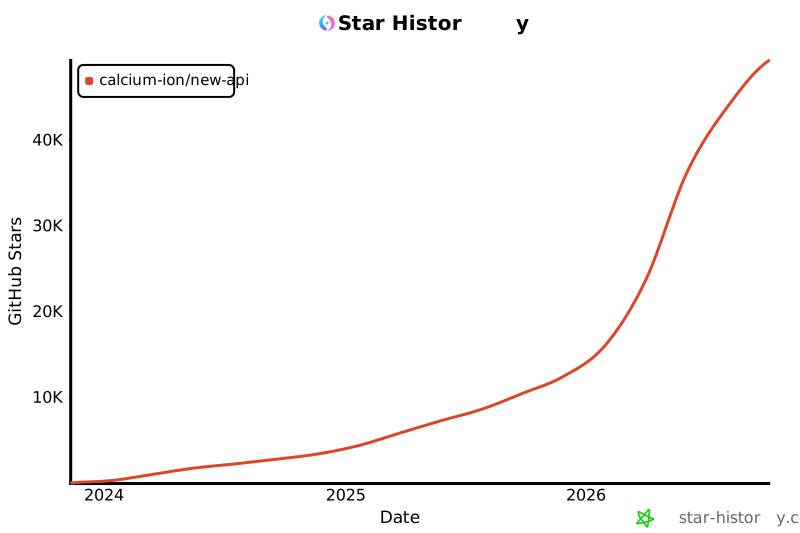](https://star-history.com/#Calcium-Ion/new-api&Date)
|
||
|
||
</div>
|
||
|
||
---
|
||
|
||
<div align="center">
|
||
|
||
### 💖 感謝使用 New API
|
||
|
||
如果這個項目對你有幫助,歡迎給我們一個 ⭐️ Star!
|
||
|
||
**[官方文件](https://docs.newapi.ai/zh/docs)** • **[問題回饋](https://github.com/Calcium-Ion/new-api/issues)** • **[最新發布](https://github.com/Calcium-Ion/new-api/releases)**
|
||
|
||
<sub>Built with ❤️ by QuantumNous</sub>
|
||
|
||
</div>
|